|
1
2
3
4
5
6
7
8
9
10
11
12
13
14
15
16
17
18
19
20
21
22
23
24
25
26
27
28
29
30
31
32
33
34
35
36
37
38
39
40
41
42
43
44
45
46
47
48
49
50
51
52
53
54
55
56
57
58
59
60
|
package swing;
import javax.swing.JFrame;
import javax.swing.JLabel;
import javax.swing.JList;
import javax.swing.JTextField;
import javax.swing.event.ListSelectionEvent;
import javax.swing.event.ListSelectionListener;
// 클래스 생성할떄 JFrame 상속,
public class ComboBoxExam extends JFrame implements ListSelectionListener{
JList list; // 1
JTextField tf; //2
public ComboBoxExam () {
//JList에서 쓸 학목을 문자열 배열로 만든다
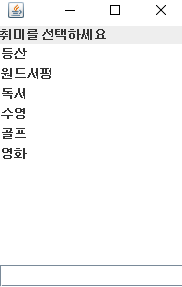
String[] str = {"등산","원드서핑","독서","수영","골프","영화"}; //3
list = new JList(str); // 4
add(new JLabel("취미를 선택하세요"), "North"); //5
add(list); //6 기본값. 안쓰면ehls . . . .
tf = new JTextField(); // 7
add(tf,"South"); //8
list.addListSelectionListener(this); //9
setDefaultCloseOperation(JFrame.DISPOSE_ON_CLOSE); //5
setSize(200,300);
setVisible(true);
}
@Override
public void valueChanged(ListSelectionEvent e) { //0
Object[] item; // 10
String total = ""; //11
if (e.getSource() instanceof JList) { // 12
JList lis = (JList)e.getSource(); // 13 > JList인지 물어보고 맞으면 JList로 형변환
item = lis.getSelectedValues(); //14
for(int i = 0; i<item.length; i++) { //15
total = total + item[i] + " "; //16 > total에있는걸 연결해주고, 한 칸 띄워주고
}
tf.setText(total+ "선택되었당");
}
}
public static void main(String[] args) {
new ComboBoxExam ();
}
}
|
cs |